
На чтение 6 мин. Просмотров 173 Опубликовано 15.12.2019
На первый взгляд, вопрос, какой CCleaner лучше, лишен смысла. Однако на второй и третий взгляды все не так уж и бессмысленно. Дело в том, что имеется несколько версий CCleaner:
- версия для компьютера;
- версия для Android;
- Portable-версия;
- версия Slim.
Содержание
- Версия для ПК
- Версия для Android
- Версия Portable
- Версия CCleaner Slim
- Платить или не платить – вот в чем вопрос
- CCleaner Free
- CCleaner Professional
- CCleaner Professional Plus
- CCleaner Portable
- Вывод.
Версия для ПК
Понятно, что эта версия предназначена для установки на персональном компьютере. Поддерживаются версии для Windows и Mac OS. Обе эти версии имеют идентичный функционал:
- очистка реестра от всякого программного «мусора» и «хвостов»;
- полное удаление приложений с жесткого диска;
- очистка кэша браузера, истории посещений;
- удаление файлов-дубликатов;
- удаление временных файлов, которые порой занимают довольно много места на жестком диске;
- удаление файлов без возможности восстановить их даже при помощи специализированных приложений.
Для использования программы ее нужно сначала установить на жесткий диск и произвести все необходимые настройки «под себя».
Версия для Android
Отвечая на опрос, какая версия CCleaner лучше, нельзя не отметить наличие версии для Андроид. Как понятно из названия, предназначена она для мобильных устройств. При этом функционал ее несколько отличается от ПК-версии:
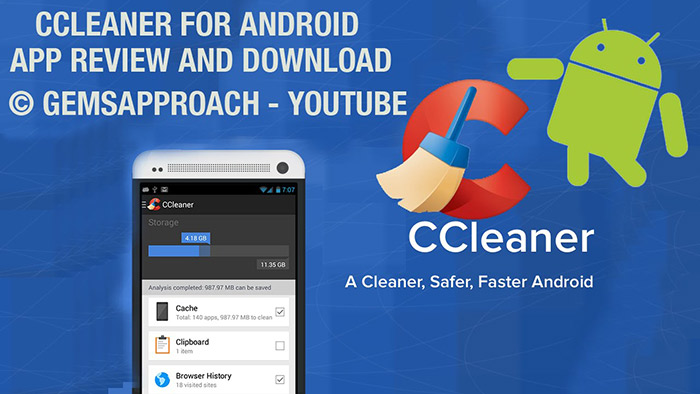
- очистка оперативной памяти устройства;
- полное удаление приложений;
- очистка кэша приложений;
- очистка кэша браузера и истории посещений;
- очистка буфера обмена.
Версия Portable
Может производить очистку реестра и жесткого диска без установки утилиты на жесткий диск. Можно запускать программу с флешки или другого съемного носителя. Данная версия может быть полезной, если программа отказывается по каким-либо причинам устанавливаться. Например, после вирусного заражения.
Версия CCleaner Slim
В целом, это обычная ПК-версия, но без панели инструментов, привязанной к самому дистрибутиву. А также отсутствует привязка к сайту Google.
Платить или не платить – вот в чем вопрос
Кроме того, существуют бесплатная и платная Pro-версия CCleaner. В большинстве своем, пользователи выбирают, конечно, бесплатную версию. Она обладает очень богатым функционалом, и ее возможностей с лихвой хватает для успешного решения большинства повседневных задач. В платной версии доступны некоторые специфические функции, которые приобретаются для бизнеса. Среди них, например:
- очистка логов IIS;
- очистка автозаполнений для форм;
- очистка кэша DNS;
- кэш системного трея и многое другое.
CCleaner – замечательная утилита, которая может быть использована для самого разнообразного круга задач. Немаловажно и то, что CCleaner обновляется практически каждую неделю, порой происходят глобальные обновления, которые существенно расширяют функционал программы. Начиная с момента своего первого релиза в 2003 году, CCleaner прошел большой путь развития и продолжает активно развиваться.
Таким образом, отвечать на вопрос, какой CCleaner лучше, нужно, исходя из собственных потребностей и сложившейся ситуации.
CCleaner – это одна из лучших программ для очистки и оптимизации работы системы. Она отличается удобным интерфейсом, присутствием лишь самых нужных функций, простотой использования, постоянной поддержкой разработчика и своевременными обновлениями.
Но самое главное – это возможность бесплатно использовать программу и выбирать именно ту версию, которая нужна вам. Вообще, у программы есть несколько версий, которые отличаются количеством доступных в ней функций.
На данный момент присутствуют:
- CCleaner Free
- CCleaner Professional
- CCleaner Professional Plus
- CCleaner Portable

Итак, рассмотрим эти версии и их функции по порядку.
CCleaner Free
Начнём с версии CCleaner Free. Это базовая и стандартная версия, в которую включены самые основные функции для очистки системы. Соответственно, это бесплатная версия, которая не требует ключа активации. Вы просто устанавливаете её и пользуетесь.
Обычно, для рядового пользователя всех функций этой версии хватает, чтобы поддерживать стабильную работу компьютера. С ней вы сможете очищать старые файлы, удалять временные файлы, находить и удалять ошибки реестра.
Помимо этого, вы сможете: управлять параметрами автозагрузки, анализировать диски, управлять дополнениями браузеров, искать дубли файлов, восстанавливать систему, безвозвратно удалять данные на дисках. А ещё настраивать программу по своему усмотрению.
Как видите, даже у бесплатной версии очень широкий функционал, поэтому многие пользователи выбирают именно её. И обычно такой версии хватает рядовому пользователю с головой. Ведь урезана она не так сильно, да и всё то, что можно делать в платных версиях – легко сделать самому.
CCleaner Professional
Эта версия CCleaner немногим отличается от базовой. Она включает в себя все те функции, что были доступны в бесплатной версии, а ещё добавлены некоторые дополнительные. Это функция автообновления, мониторинга ненужных файлов в реальном времени, а ещё автоматическая очистка истории при выходе из браузера. Как видите, функции в основном дополнительные и практически никак не влияют на очистку компьютера.
Это уже платная версия, которую необходимо приобрести, однако, у вас будет возможность воспользоваться бесплатным пробным периодом.
CCleaner Professional Plus
Наиболее полная версия программы. В неё входят все функции, которые предусматривали разработчики. Если сравнивать её с версией Professional, то в Plus версию был добавлен Defragger. Эта приложение, которое позволит вам следить за состоянием вашего жёсткого диска.
Помимо этого, есть функция восстановления файлов. Она реализована в утилите Recuva. Благодаря этому, вы не будете волноваться о том, что файлы могут быть случайно удалены или утеряны.
И последней дополнительной утилитой является Speccy, которая предназначена для обнаружения и устранения проблем внутри вашего ПК. Ещё она даст вам возможность исправлять эти ошибки и устанавливать обновления для устаревших драйверов и.т.д.
CCleaner Portable
Это особая версия программы, которая не привязана ни к какой отдельной платформы, а значит, подходит для всех. Она не требует установки и создана для того, чтобы запускать CCleaner, если на компьютере возникли какие – то проблемы. Других различий между базовыми версиями у неё нет.
Вывод.
Таким образом, можно сказать, что разработчики предусмотрели вариант, при котором пользователь может выбрать именно ту версию программы, которая ему подходит лучше всего. Если вам не нужны все дополнительные функции программы, или вы опытный пользователь, который может с лёгкостью сделать всё вручную – вы можете выбрать Free версию.
Если же у вас не хватает времени, чтобы полноценно заняться очисткой компьютера, или же вам попросту лень – вы можете приобрести расширенные версии программы, которые сделают это автоматически. А ещё они отлично подойдут для владельцев бизнеса, поскольку некоторые их функции заточены именно под него.
Версия Portable используется для устранения неполадок, если по каким – то причинам вы не можете установить обычные версии Cclaner.
Все версии CCleaner можно найти на нашем сайте.
Я пользуюсь бесплатным — ПОРТАБЛ версией.
Свое дело она делает.
У меня вообще стоит 3 проги
CCleaner, Auslogics BoostSpeed, RegCleanr
Каждая прога хороша по-своему.
CCleaner Business Edition – бизнес-версия программы, предназначена для компаний и учреждений. Подходит для коммерческого применения. Премиум бизнес-поддержка в комплекте.
CCleaner Technician Edition – версия для технических специалистов, сборщиков PC, системных администраторов.
Содержание
- CCleaner Free
- CCleaner Professional
- CCleaner Professional Plus
- CCleaner Portable
- Вывод.
- Ccleaner technician edition
CCleaner – это одна из лучших программ для очистки и оптимизации работы системы. Она отличается удобным интерфейсом, присутствием лишь самых нужных функций, простотой использования, постоянной поддержкой разработчика и своевременными обновлениями.
Но самое главное – это возможность бесплатно использовать программу и выбирать именно ту версию, которая нужна вам. Вообще, у программы есть несколько версий, которые отличаются количеством доступных в ней функций.
На данный момент присутствуют:
- CCleaner Free
- CCleaner Professional
- CCleaner Professional Plus
- CCleaner Portable
Итак, рассмотрим эти версии и их функции по порядку.
CCleaner Free
Начнём с версии CCleaner Free. Это базовая и стандартная версия, в которую включены самые основные функции для очистки системы. Соответственно, это бесплатная версия, которая не требует ключа активации. Вы просто устанавливаете её и пользуетесь.
Обычно, для рядового пользователя всех функций этой версии хватает, чтобы поддерживать стабильную работу компьютера. С ней вы сможете очищать старые файлы, удалять временные файлы, находить и удалять ошибки реестра.
Помимо этого, вы сможете: управлять параметрами автозагрузки, анализировать диски, управлять дополнениями браузеров, искать дубли файлов, восстанавливать систему, безвозвратно удалять данные на дисках. А ещё настраивать программу по своему усмотрению.
Как видите, даже у бесплатной версии очень широкий функционал, поэтому многие пользователи выбирают именно её. И обычно такой версии хватает рядовому пользователю с головой. Ведь урезана она не так сильно, да и всё то, что можно делать в платных версиях – легко сделать самому.
CCleaner Professional
Эта версия CCleaner немногим отличается от базовой. Она включает в себя все те функции, что были доступны в бесплатной версии, а ещё добавлены некоторые дополнительные. Это функция автообновления, мониторинга ненужных файлов в реальном времени, а ещё автоматическая очистка истории при выходе из браузера. Как видите, функции в основном дополнительные и практически никак не влияют на очистку компьютера.
Это уже платная версия, которую необходимо приобрести, однако, у вас будет возможность воспользоваться бесплатным пробным периодом.
CCleaner Professional Plus
Наиболее полная версия программы. В неё входят все функции, которые предусматривали разработчики. Если сравнивать её с версией Professional, то в Plus версию был добавлен Defragger. Эта приложение, которое позволит вам следить за состоянием вашего жёсткого диска.
Помимо этого, есть функция восстановления файлов. Она реализована в утилите Recuva. Благодаря этому, вы не будете волноваться о том, что файлы могут быть случайно удалены или утеряны.
И последней дополнительной утилитой является Speccy, которая предназначена для обнаружения и устранения проблем внутри вашего ПК. Ещё она даст вам возможность исправлять эти ошибки и устанавливать обновления для устаревших драйверов и.т.д.
CCleaner Portable
Это особая версия программы, которая не привязана ни к какой отдельной платформы, а значит, подходит для всех. Она не требует установки и создана для того, чтобы запускать CCleaner, если на компьютере возникли какие – то проблемы. Других различий между базовыми версиями у неё нет.
Вывод.
Таким образом, можно сказать, что разработчики предусмотрели вариант, при котором пользователь может выбрать именно ту версию программы, которая ему подходит лучше всего. Если вам не нужны все дополнительные функции программы, или вы опытный пользователь, который может с лёгкостью сделать всё вручную – вы можете выбрать Free версию.
Если же у вас не хватает времени, чтобы полноценно заняться очисткой компьютера, или же вам попросту лень – вы можете приобрести расширенные версии программы, которые сделают это автоматически. А ещё они отлично подойдут для владельцев бизнеса, поскольку некоторые их функции заточены именно под него.
Версия Portable используется для устранения неполадок, если по каким – то причинам вы не можете установить обычные версии Cclaner.
Все версии CCleaner можно найти на нашем сайте.
Ccleaner technician edition
Автор Максим Черняков задал вопрос в разделе Программное обеспечение
В чём разница ccleaner? и получил лучший ответ
Ответ от Artificial intelligence[гуру]
cмотри таблицу.
Я пользуюсь бесплатным — ПОРТАБЛ версией.
Свое дело она делает.
У меня вообще стоит 3 проги
CCleaner, Auslogics BoostSpeed, RegCleanr
Каждая прога хороша по-своему.
CCleaner Business Edition – бизнес-версия программы, предназначена для компаний и учреждений. Подходит для коммерческого применения. Премиум бизнес-поддержка в комплекте.
CCleaner Technician Edition – версия для технических специалистов, сборщиков PC, системных администраторов.
Технологии изменили мир, поскольку устройства работают в полную силу, чтобы ускорить процесс.
Но что, если на вашем устройстве много нежелательных файлов и недействительных реестров Windows, то как оно будет поддерживать темп, когда оно уже замедлилось.

Итак, давайте прочитаем о разработчике утилиты с многочисленными инструментами, чтобы все шло гладко. CCleaner — это программное обеспечение Piriform, которое устраняет все эти ошибки за считанные минуты и обеспечивает наилучшую остановку технологии.
CCleaner — это программа, которая сортирует все ошибки для ваших устройств. Он был разработан самой Microsoft, а затем выпущен для других операционных программ.
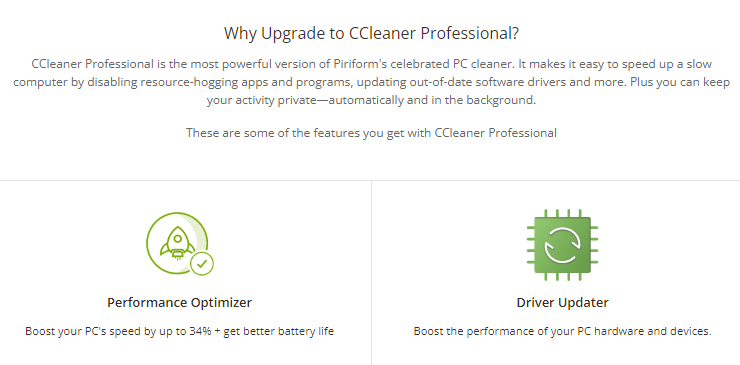
CCleaner был запущен в 2004 году и в ближайшие годы расширится с ПК на Android. Он имеет большую поддержку персонала, которая достаточно мощна, чтобы справиться со всеми видами суеты, с которыми сталкиваются пользователи.
CCleaner — одно из первоклассных программ, которое стало благом для пользователей, столкнувшихся с трудностями, связанными с нежелательными файлами и реестрами окон, негативно влияющими на устройство.
За и против
Плюсы
- Простой в использовании;
- Надежный и известный.
- Доступный для всех.
- 45 дней бесплатной версии.
- Множество инструментов в одной упаковке.
Минусы
- Перекрывает другое программное обеспечение.
- Требование лицензии.
- Слишком технично для использования.
Тарифный план CCleaner
CCleaner, являющийся фаворитом пользователей, сдержал свое обещание обслуживать их максимально простым способом. Быть финансово доступным для каждого пользователя — сложная задача, но CCleaner справляется с ней с изяществом.
Цены на CCleaner следующие:
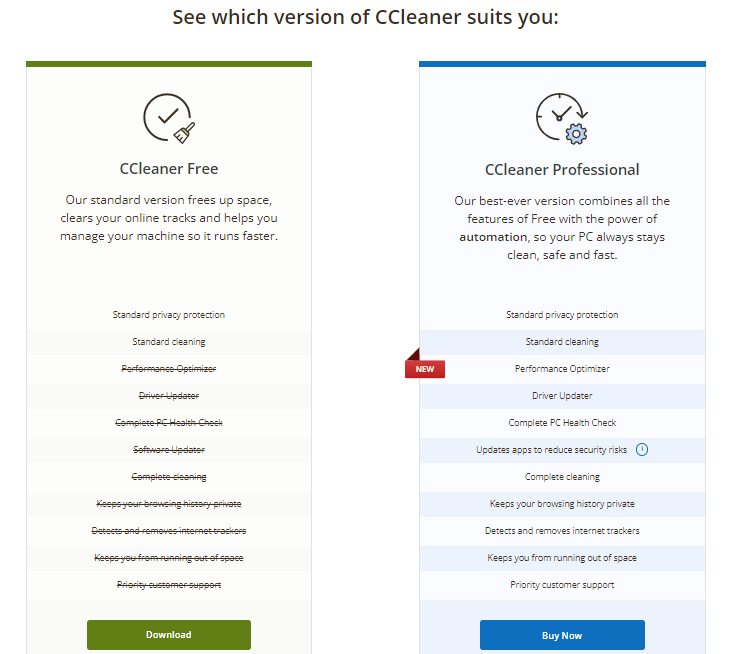
Профессиональная версия: $ 24.99 XNUMX / год.
Pro версия: $ 39.99 / год
Бесплатная версия: 0.00 долл. США на 45 дней.
Различные версии CCleaner
У CCleaner есть разные версии, в которых описаны функции, которые он может нести. Пользователи должны понять, что дает конкретный план, прежде чем перейти к выбору.
Основные четыре версии: бесплатная, профессиональная с программой обновления драйверов, профессиональная плюс с программой обновления дисков (до 3 ПК) и премиум-пакет с программой обновления драйверов (до 5 ПК).
Особенности CCleaner
Похвалы и требования к платформе справедливы, но настоящий вопрос заключается в том, чтобы выяснить, что она может предложить.
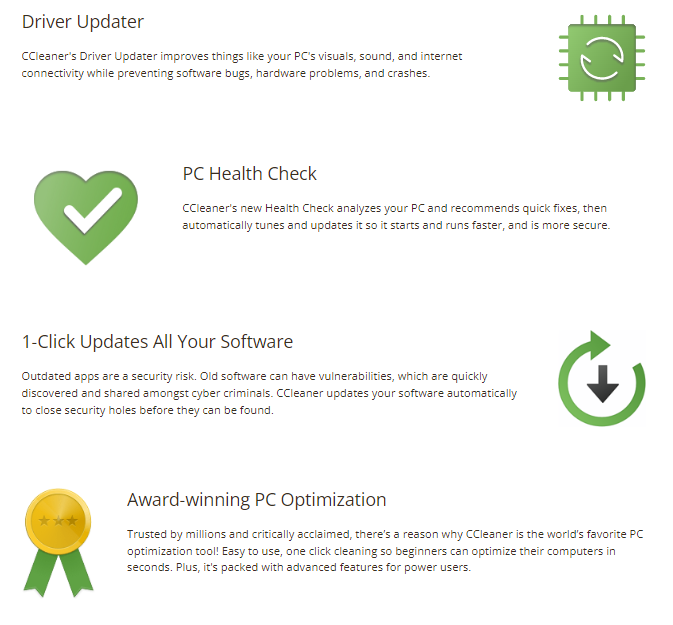
Основные функции, которые следует учитывать перед тем, как выбрать CCleaner, следующие:
Онлайн-управление треками.
Веб-сайты, которые вы посещаете, также вызывают проблемы с устройствами. Так что больше не нужно думать 24/7 о том, что вдруг случилось с темпом вашего устройства. CCleaner удалит все ваши файлы cookie онлайн-треков и ненужные данные, которые могут нанести вред вашему устройству.
Конфиденциальность
Управление вашими онлайн-треками путем удаления ненужных данных не должно быть причиной нарушения права на неприкосновенность частной жизни. Это значение, которое несет CCleaner. Поскольку он держит границы не в себе в шпионском программном обеспечении и наносит ущерб конфиденциальности пользователей.
Software Updater
Средство обновления программного обеспечения, предоставляемое CCleaner, достаточно, чтобы устранить большинство проблем с обновленного ПК. Поскольку CCleaner знает, к чему может привести обновление, очень важно понимать, что программа обновления на вашей стороне, несомненно, приведет к обслуживанию вашего ПК наилучшим образом.
Быстрый компьютер
Что происходит, когда лишний вес удаляется во время гонки? Ответ заключается в том, что вы будете работать быстрее, и то же самое произойдет с вашим компьютером, когда CCleaner установлен и используется. Потому что он удаляет достаточно мусора, чтобы обеспечить скорость ПК.
Оптимизатор производительности
Эффективный оптимизатор будет регулярно проверять ваш компьютер и следить за тем, чтобы все лишние и неактивные программы управлялись и удалялись для наилучшего использования вашего компьютера. Оптимизатор производительности, предоставляемый CCleaner, определенно станет лучшим доктором для вашего ПК.
Блестящий набор инструментов
Инструменты, представленные на платформе CCleaner, являются первоклассными и не ограничиваются номинальной очисткой программного обеспечения. Многочисленные инструменты работают вместе, чтобы предоставить пользователям лучшие версии ПК.
Каковы ожидания от CCleaner?
CCleaner можно пометить как постоянное решение для всех тех, которые замедляют работу файлов, хранящихся на ваших устройствах. Это соответствует ожиданиям, которые все возлагают на служебное программное обеспечение.
CCleaner обслуживает весь мир, что делает необходимым существование на нескольких языках. CCleaner можно использовать на 58 языках, расширяя возможности глобального использования программного обеспечения.
CCleaner — это антивирус?
Нет, CCleaner не является антивирусом, поскольку люди часто путают его с антивирусом. Хотя это ограничивается очисткой компьютера и предоставлением оптимизаций/обновлений для пользователей.
CCleaner не может обнаруживать вирусы, поэтому, даже если после использования CCleaner производительность снижается, жизненно важно использовать антивирус, поскольку вирусы обычно являются причиной такого поведения.
CCleaner не является антивирусом, но то, что он делает, было не чем иным, как благом для пользователей.
Каковы преимущества CCleaner?
CCleaner имеет несколько преимуществ, которые можно охарактеризовать как главный фактор привлекательности для всех. Эти преимущества заставляют пользователей выбирать CCleaner в качестве своего служебного партнера.
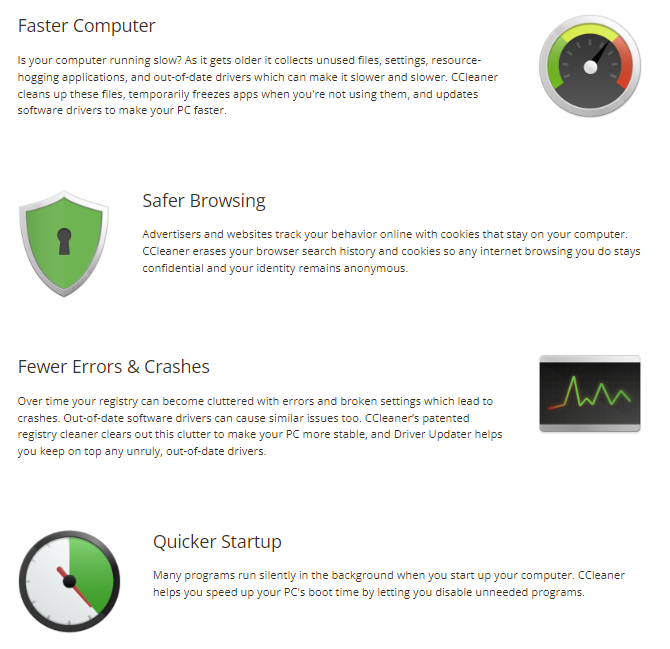
Основные преимущества использования CCleaner заключаются в следующем:
Надежный
CCleaner очень надежен благодаря своей структуре и родительскому программному обеспечению. Признание ведущих средств массовой информации также привело пользователей к выбору безупречных услуг.
30 дней назад деньги
Как насчет возврата денег, если вы не удовлетворены? Баг да у всех, кто получает обещание такого типа. Так что не волнуйтесь, если хороших слов недостаточно, чтобы вы выбрали CCleaner.
Потому что даже после того, как вы подобрали платные версии и использовали их в течение 30 дней, кто может потребовать возврат денег. Это преимущество действительно многообещающее и не позволит вам усомниться в доверии к CCleaner.
Служба поддержки.
Не беспокойтесь о том, что вы застрянете из-за сбоев, поскольку поддержка клиентов, предоставляемая CCleaner, почти идеальна. Круглосуточная помощь предоставляется с точки зрения устранения препятствий, которые могут возникнуть при использовании услуг.
Недорогой
Кто не хочет иметь что-то идеальное, не тратя много денег? Ответ: каждый, потому что как только вы поймете, что ценообразованием можно управлять, чтобы услуги были недорогими, если поставщик честен, вы никогда не захотите тратить сравнительно много денег.
Это самое большое преимущество использования CCleaner, поскольку оно помогает пользователям получать первоклассные услуги по самым низким ценам.
Совместимость
Глобальные пользователи различаются по операционным системам. Таким образом, поставщик услуг несет ответственность за обеспечение совместимости программного обеспечения с этим операционным программным обеспечением, и CCleaner выполняет все это, оставаясь совместимым с Max, Windows, Linux и Android.
Как использовать CCleaner?
CCleaner очень прост в использовании и установке. Пользователям не нужно сильно беспокоиться о процессе установки, поскольку родительское программное обеспечение CCleaner является технологическим гигантом.
Нужно посетить магазин игр или веб-сайт CCleaner на своих устройствах (Mac, Linux, Android или ПК), отсюда они получат нужную версию.
Бесплатные версии на 45 дней можно легко активировать, но для платных версий платежи должны производиться способами, указанными для платежей.
Опасен ли CCleaner?
Один из мифов, который так долго существует на рынке и который необходимо развеять, заключается в том, что CCleaner опасен. Прямой ответ на то же самое — большое «Нет».
Основная цель CCleaner — удалить с устройства все нежелательные файлы, которые могут нанести вред устройству и которые не нужны.
Этот CCleaner никоим образом не изменит природу программного обеспечения ваших устройств, исключая вероятность того, что оно будет опасным.
Заключение – окончательный вердикт
CCleaner обладает несколькими качествами и функциями, которые могут сделать его идеальным выбором для пользователя служебного программного обеспечения. Функции определяют каждую цель служебной программы, которая позволяет пользователям полагаться на CCleaner для достижения поставленной цели.
Поэтому, если каким-либо образом ваше устройство становится медленным и сильно зависает из-за нежелательных файлов, ловушек и реестров окон, CCleaner — ваш помощник в решении этой ситуации.
Часто задаваемые вопросы
В чем заключается работа CCleaner?
CCleaner — это первоклассная утилита, используемая для удаления нежелательных ненужных файлов и кешей с вашего ПК или любого другого устройства.
Когда был запущен CCleaner?
CCleaner был впервые запущен в 2004 году, а затем до последних лет расширялся до других программ и сервисов.
CCleaner опасен?
Нет, CCleaner создан для того, чтобы помочь пользователям исправлять ненужные и ненужные файлы на своих компьютерах и других устройствах. Это никогда не навредит устройству.
Насколько надежен CCleaner?
CCleaner изначально разрабатывался никем иным, как Microsoft, что подтверждает надежность программного обеспечения на самом высоком уровне.
Насколько хорошо CCleaner помогает пользователям?
Качество услуг, предоставляемых CCleaner, не уступает таким высококлассным СМИ, как Guardian и Forbes.
Доступен ли CCleaner во всем мире?
CCleaner доступен по всему миру и работает на 58 языках, что упрощает использование и устраняет языковой барьер.
CCleaner тоже работает как антивирус?
Ни у одного CCleaner нет этого недостатка, поскольку даже будучи идеальным очистителем, он не может обнаружить вирусы на вашем компьютере. Поэтому для вирусов должны быть установлены надежные антивирусы.
Как часто следует использовать CCleaner?
Использование CCleaner два или три раза в неделю достаточно для управления производительностью вашего компьютера. Даже ежедневное использование никак не повредит системе.
- Обзор MacPaw: это лучшее решение проблем с Mac?
- Предложение CCleaner «Черная пятница» [скидка до 50%]
CCleaner — Products Policy
This Policy was last updated in July 2022
CCleaner
CCleaner for Windows
Official Product Name
CCleaner Free, CCleaner Professional, CCleaner Business Edition, CCleaner Technician Edition (collectively as “CCleaner for Windows”)
Core Functionality
CCleaner for Windows is a safe and trusted PC utility that speeds up and cleans your PC, applies updates, securely wipes data and solves other computer problems.
What are the Product’s Main Features
- Custom Clean cleans your browser history, cached images, cookies including both first-party and third-party cookies, and other junk with just one click, to keep your activity private and free up disk space.
- Health Check cleans your browser history, cached images, cookies including both first-party and third-party cookies, and other junk, to keep your activity private and free up disk space. Also conveniently updates third-party applications, and disables unnecessary startup items to reduce the time taken to start your PC.
- Performance Optimizer allows you to optimize your PC’s performance by safely placing apps into ‘sleep mode’ so they do not use system resources after they have been closed down.
- Driver Updater provides an overview of your drivers and transmits authentic updates securely to your device to maintain the components that manage your sound, visuals, internet connection, and basic hardware like your mouse and keyboard.
- Software Updater conveniently updates third-party applications in a batch process.
- Apps Uninstaller permits uninstallation of all applications on the PC, including those that Windows typically won’t allow you to.
- Startup Manager allows management of items that run at Windows startup.
- Browser Plugin Manager facilitates management of plugins from all browsers from a single interface.
- Disk Analyzer analyzes your disk internal and external drives to provide insights on disk usage by file type.
- Drive Wiper allows secure deletion of files on an internal or external drive, making original file content practically irretrievable.
- Smart Clean provides contextual triggers for cleaning and cleaning alerts allowing, for example, designated browsers to be cleaned every time they are closed.
- Scheduled Cleaning allows cleaning to be run automatically according to a specified frequency.
Personal Data We Process
When you use CCleaner for Windows to clean your PC (Custom Clean, Health Check ‘Junk’ and ‘Privacy’ sections, Scheduled Cleaning, Smart Clean, Drive Wiper, Registry Cleaner, Disk Analyzer), the following data may be processed locally on your system depending on the feature used:
- Form data saved in your browsers such as name, surname, email, passwords;
- Cookies or data from websites that you visit;
- Installed browsers and browser plugins;
- Records of what you downloaded from websites;
- Files on the device;
- Windows User profile names;
- Web domains belonging to cookies found on the device;
- User-defined web domain rules used for preventing cookie deletion;
- Entries in the Windows system Registry
This data is processed on your device and is not sent to our environment. Furthermore, CCleaner does not read the contents of files or databases because it does not need to. It just deletes the file or wipes all or part of a database.
When you use CCleaner for Windows to manage applications and services on your PC (Health Check ‘Speed’ section, Uninstaller, Startup Manager, Browser Plugin Manager), the following data may be processed locally on your system depending on the feature used:
- Installed browsers and browser plugins;
- Installed applications;
- Startup items/services and scheduled tasks;
This data is processed on your device and is not sent to our environment.
While using CCleaner for Windows, we collect and process the following Service and Device Data (in addition to Billing Data for paid version) in our environment:
|
Service Data |
What we use it for and for how long |
|
IP address |
Service Provision (24 months)
|
|
Identifier of the content (message) being delivered |
Service Provision (24 months)
In-product Messaging (6 months)
Product and Business Improvement (24 months)
|
|
Events and product usage |
Service Provision (24 months)
In-product Messaging (6 months)
Product and Business Improvement (24 months)
|
|
Number of application launches |
Service Provision (24 months)
|
|
License key |
Service Provision (36 months)
|
|
Product settings |
Service Provision (24 months)
In-product Messaging (6 months)
Product and Business Improvement
|
|
Device Data |
What we use it for and for how long |
|
Internal online identifiers (GUID, Device ID) |
Service Provision (24 months)
In-product Messaging (6 months)
Product and Business Improvement (24 months)
|
|
OS version |
Service Provision (24 months)
Product and Business Improvement (24 months)
|
|
Location |
Service Provision (12 months)
In-product Messaging (6 months)
Product and Business Improvement (24 months)
|
|
CCleaner version |
Service Provision (24 months)
In-product Messaging (6 months)
Product and Business Improvement (24 months)
|
|
Install date or time |
Service Provision (36 months)
In-product Messaging (6 months)
Product and Business Improvement (24 months)
|
|
Hardware data (device model, RAM, GPU, CPU) |
Service Provision (24 months)
|
|
Windows language and locale |
Service Provision (24 months)
Product and Business Improvement (24 months) |
|
Information concerning applications on the device (names of applications and their background processes) |
Service Provision (24 months)
|
|
Information concerning drivers (driver version, updated date, name, matching device id, driver rank, driver flags) |
Service Provision (24 months)
|
|
Security apps / antiviruses on the device |
In-product Messaging (6 months)
|
These are the third-party analytics tools we use for CCleaner for Windows:
- Google Analytics
- Logentries
For further information regarding our third-party analytics partners, including their privacy policies, please refer to our General Privacy Policy.
CCleaner for Mac
Official Product Name
CCleaner for Mac
Core Functionality
CCleaner for Mac is a safe and trusted utility that speeds up and cleans your Mac, securely wipes data and solves other computer problems.
What are Product’s Main Features
- Cleaner cleans your browser history, cached images, cookies including both first-party and third-party cookies, and other junk with just one click, to keep your activity private and free up disk space.
- Apps Uninstaller permits uninstallation of all applications on the PC, including those that Windows typically won’t allow you to.
- Erase Free Space writes over the unused space on a disk to prevent the recovery of deleted files.
- Large File Finder finds large files for removal, to help free up disk space.
- Duplicate Finder tracks down duplicate files on your PC that can take up extra space.
- Smart Cleaning contextual triggers for cleaning and cleaning alerts allowing, for example, designated browsers to be cleaned every time they are closed.
Personal Data We Process
While using CCleaner for Mac, we collect and process the following Service and Device Data (in addition to Billing Data for paid version):
|
Service Data |
What we use it for and for how long |
|
IP address |
Service Provision (24 months)
|
|
Number of application Installations |
Service Provision (24 months)
|
|
License key |
Service Provision (36 months)
|
|
Device Data |
What we use it for and for how long |
|
Internal online identifiers (GUID, Device ID) |
Service Provision (24 months)
|
|
OS version |
Service Provision (24 months)
|
|
Location |
Service Provision (12 months)
|
|
CCleaner version |
Service Provision (24 months)
|
These are the third-party analytics tools we use for CCleaner for Mac:
- Logentries
For further information regarding our third-party analytics partners, including their privacy policies, please refer to our General Privacy Policy.
CCleaner for Mobile (Android)
Official Product Name
CCleaner for Android, CCleaner for Android Premium (collectively as “CCleaner for Mobile (Android)”)
Core Functionality
CCleaner for Mobile (Android) detects and removes unnecessary files to free up storage space. Equally, it can stop running processes to optimize device performance.
What are Product’s Features
- Apps Overview allows you to browse installed and pre-installed applications, providing functionality to uninstall or stop. In particular, this feature relies on processing device provided stats about other apps. These stats are processed locally (on device) in order to provide the service.
- Media Overview provides an overview of files broken down by type (eg images, audio files, video). This feature does not need any specific data processing outside of operations made locally (on device).
- Battery Saver allows users to select conditions where desired actions (system settings changes) should be applied by this product. For example one can automatically decrease screen brightness when at home. Location based conditions require permission to get location data, however these data are never transmitted from the device and all are processed locally.
- Cloud Transfers allow users to backup their files to an external cloud storage. We are using Google Drive and Dropbox APIs to do so, e.g. you can login using their Google or Dropbox credentials to establish such connections. Note credentials are not visible to us.
Personal Data We Process
While using CCleaner for Mobile (Android), we collect and process the following Service and Device Data (in addition to Billing Data for paid version):
|
Service Data |
What we use it for and for how long |
|
Identifier of the content (message) being delivered |
Service Provision (36 months)
In-product Messaging (6 months)
Product and Business Improvement (14 months)
|
|
IP address |
Service Provision (36 months)
In-product Messaging (6 months)
Product and Business Improvement (14 months)
|
|
Events and product usage |
Service Provision (36 months)
In-product Messaging (24 months)
Product and Business Improvement
|
|
Device Data |
What we use it for and for how long |
|
Online identifiers (GUID, Device ID (Android ID), Hardware ID, Profile ID, Advertising ID) |
Service Provision (36 months)
In-product Messaging (24 months)
Product and Business Improvement
Third-party Ads (not stored after provision)
|
|
Information concerning computer or device (carrier, OS version, OS build number, hardware ID, device model, device brand, device manufacturer, device API level) |
Service Provision (36 months)
In-product Messaging (6 months)
Product and Business Improvement
|
|
Location (city/country, longitude and latitude) |
Service Provision (36 months)
In-product Messaging (6 months)
Product and Business Improvement
|
|
Applications |
Service provision (36 months)
In-product Messaging (6 months)
Product and Business Improvement (14 months)
|
|
Internet and connection |
Service provision (36 months)
In-product Messaging (6 months)
Product and Business Improvement
|
These are the third-party analytics tools we use for CCleaner for Mobile (Android):
- Google Firebase Analytics and Crashlytics for Android
- AppsFlyer
For further information regarding our third-party analytics partners, including their privacy policies, please refer to our General Privacy Policy.
The free version of CCleaner for Mobile (Android) serves relevant third-party advertisements. These are the advertising partners we use for this product:
- Google AdMob
- Facebook Audience Network
- InMobi
- Twitter MoPub
- AppLovin
- Unity Technologies
- IronSource
For further information regarding our third-party ads partners, including their privacy policies, please refer to our Consent Policy.
Kamo
Official product name
Kamo
Core Functionality
As you browse the web, profiles of your behavior are compiled and linked to you via cookies and fingerprint-based tracking technologies. This data can be then shared and sold by analytics and ad-tech firms. Certain activities you engage in are also collected by the Windows operating system. Kamo removes cookies and masks the device’s “fingerprint” to prevent third-parties from identifying you and following your behavior across the web, and turns off the various settings that allow data collection in the Windows operating system.
What are Product’s Features
- Anti-Fingerprinting stops scripts from fingerprinting the user’s device and tracking their browsing behavior across the web.
- Privacy Score provides the user with an evaluation of how private they are based on various in-app configurations.
- Clears your browser history and cookies helps the user manage their browsing history and cookies by allowing them to manually clear them or schedule automatic clearing at their discretion.
- Windows System Privacy collates the 90+ Windows operating system settings that impact the user’s privacy, and makes them controllable with just a handful of switches in one place.
- VPN feature allows to protect your privacy by hiding your location and encrypting your online communication. It allows you to pick a specific location to be connected from.
Personal Data We Process
When disguising your browser fingerprint, Kamo may process the following data locally on your system:
- Browsers you have installed (if Chrome, Edge, Internet Explorer, Opera, or Firefox) and their versions;
- Any extensions you have installed;
- Your hardware data;
- OS version of your device; and
- Any scripts running in your browser from third-party websites.
Kamo uses this information in order to detect tracking attempts and to generate fake, substitute data to fool fingerprinting attempts (for example, by changing your screen resolution data or your browser’s version). Kamo does not record this data, nor does it send it back to our environment. It uses it locally and on the spot.
When cleaning your browsing, Kamo may process the following data locally on your system:
- Form data saved in your browsers such as name, surname, email, passwords;
- Cookies or data from websites that you visit;
- Records of what you downloaded from websites;
- Web domains belonging to cookies found on the device;
- Browsing history; and
- User-defined web domain rules used for preventing cookie deletion.
This data is processed on your device and is not sent to our environment. Furthermore, Kamo does not read the contents of your browser’s data because it does not need to. It just deletes the file or wipes all or part of a database.
When locking down Windows for privacy, Kamo may process the following data locally on your system:
- What version of Windows 10 you are running;
- Status of 90+ settings in Windows 10 which have an impact on your privacy; and
- Any changes to the Windows settings in question triggered by a Windows update.
This data is processed on your device. Kamo does not record this data, nor does it send it back to our environment.
When generating a privacy score, Kamo may process the following data locally on your system:
- What Kamo settings you have enabled;
- The number of installed browsers for whom you have enabled Kamo’s protection; and
- A score based on the above data points.
This data is processed on your device. Kamo does not record this data, nor does it send it back to our environment.
We process only the following Service and Device Data (in addition to Billing Data for paid version):
|
Service Data |
What we use it for and for how long |
|
Usage Frequency |
Service Provision (the earlier lifetime of the account and 6 years)
|
|
Number of Application Launches |
Service Provision (the earlier lifetime of the account and 6 years)
|
|
License Key |
Service Provision (the earlier lifetime of the account and 6 years)
|
|
Timestamps of connections for VPN |
Service Provision (35 days)
|
|
Amount of data transmitted for VPN |
Service Provision (35 days)
|
|
Device Data |
What we use it for and for how long |
|
OS Version |
Service Provision (the earlier lifetime of the account and 6 years)
Product and Business Improvement
|
|
OS Locale |
Service Provision (the earlier lifetime of the account and 6 years)
In-product Messaging (6 months)
Product and Business Improvement
|
|
Kamo version |
Service Provision (the earlier lifetime of the account and 6 years)
In-product Messaging (6 months)
Product and Business Improvement (50 months)
|
|
Install Date or Time |
Service Provision (the earlier lifetime of the account and 6 years)
In-product Messaging (6 months)
Product and Business Improvement (48 months)
|
|
Crash Incidents |
Service Provision (the earlier lifetime of the account and 6 years)
|
We do not use third-party analytics tools to process data in Kamo.
CCleaner Cloud
Official Product Name
CCleaner Cloud for Business
Core Functionality
The management console makes it easy to deploy CCleaner to multiple devices, manage all devices from one place, schedule regular cleans, and quickly add more devices.
What are Product’s Features
- Automatic peak performance schedules CCleaner and Defraggler so devices stay clean without you doing a thing
- Perform group actions allow you to save time by cleaning, defragging and other actions to multiple computers at once
- Protect your privacy helps protect corporate data by remotely deleting browser search history, passwords and cookies
- Fix problems & get alerts, repair Windows Registry issues and be warned before problems even occur
- Monitor Devices uses the console to monitor the health of all managed devices from one place, schedule regular scans, and more.
- Management Dashboard activates devices, adds devices to groups, configures setting profiles from an easy-to-read dashboard.
- Notifications receive instant email notifications on any defined event that needs your attention, including software installs, user logins, and full disks.
- Reporting views reports that include out of date agents, cleaning summary, and hardware/software specifications.
Personal Data We Process
We process only the following Data in addition to Billing Data:
|
Device Data |
What we use it for |
|
Internal online identifiers (Computer ID) |
Service Provision
Product and Business Improvement
|
|
Information concerning computer or device |
Service Provision
Product and Business Improvement
|
|
Location, IP and MAC addresses |
Service Provision
|
|
Device status (last connection to CCleaner) |
Service Provision
|
|
Location |
Product and Business Improvement
Service Provision
|
|
Service Data |
What we use it for |
|
Identifier of the content (message) being delivered |
Service Provision
|
|
Applications |
Service Provision
|
|
Events and product usage |
Service Provision
Product and Business Improvement
In-Product Messaging
|
|
Admin and User Data |
What we use it for |
|
Name, surname, email address |
Service provision
|
|
User access rights |
Service provision
|
We will process the above mentioned data only as long as necessary for the described purposes. We use rolling deletion periods which means we regularly delete collected data in the given periods starting from the collection of that respective data.
The third-party analytics tools we use for CCleaner Cloud:
- Google Analytics
- Logentries
- Loggly
For further information regarding our third-party analytics partners, including their privacy policies, please refer to our General Privacy Policy.
CCleaner Browser
CCleaner Browser for Desktop
Official Product Name
CCleaner Browser
Core Functionality
CCleaner Browser is a product currently offered for PC Windows.
What are Product’s Features
- Security & Privacy Center is built in Security & Privacy Center which is a curated collection of some key security and privacy features, tools and settings, organized into one management console making it easier for you to control and manage your online privacy and security.
- Anti-Phishing blocks malicious websites and downloads to help prevent your personal computer from becoming infected with viruses, spyware, and ransomware.
- Privacy Cleaner cleans your browser history, cached images, cookies including both first-party and third-party cookies, and other junk with just one click, to keep your activity private and free up disk space.
- Private Mode prevents your browsing history from being stored and removes any tracking cookies (both first-party cookies and third-party cookies) or web cache you pick up during that browsing session.
- Anti-Phishing V2 (Phalanx) blocks malicious websites and downloads to help prevent your personal computer from becoming infected with viruses, spyware, and ransomware.
- Adblock stops Ads being shown in your browser using publicly available so called blocking lists. AdBlock usually does not remove ads, it already prevents them from being loaded and thus also speeds up browser experience.
- Anti-Tracking prevents the user from being tracked across websites by avoiding tracking cookies to be created. This is done using publicly available so called blocking lists. Anti-Tracking usually does not remove the tracking cookies, instead it already prevents them from being loaded and created and thus also speeds up browser experience.
- Anti-Fingerprinting prevents the user from being tracked across websites using browser fingerprinting techniques. As fingerprinting itself cannot be prevented or avoided, this feature prevents being tracked by altering the digital fingerprint of the users browser or PC combination in a way that third-party sites cannot re-identify it.
Personal Data We Process
By default, CCleaner Browser processes locally on your system the following data:
- Browsing history information; for example CCleaner Browser for Desktop may store the URLs of pages that you visit, a cache of text, images and other resources from those pages. If the pre-rendering feature is turned on, a list of IP addresses linked to those pages may also be stored for some period of time;
- Name, surname, email or passwords to help you fill out forms or signs in to sites you visit;
- Permission that you have granted to websites;
- Cookies or data from websites that you visit;
- Data saved by add-ons;
- Record of what you downloaded from websites;
- Any feedback which you decide to share with us.
This data is not sent to our environment. You can manage this data within CCleaner Browser under the “Advanced” section of the Settings page.
In our environment we process the following Service and Device Data while using CCleaner Browser:
|
Service Data |
What we use it for and for how long |
|
IP address |
Service Provision (36 months)
|
|
Events and product usage |
Service Provision (36 months)
In-product Messaging (24 months)
Product and Business Improvement
|
|
User’s feedback ratings |
Service Provision (36 months)
Product and Business Improvement
|
|
User’s feedback comments |
Service Provision (1 month)
Product and Business Improvement (1 month)
|
|
Device Data |
What we use it for and for how long |
|
Online identifiers (GUIDs, Device IDs) |
Service Provision (36 months)
In-product Messaging (24 months)
Product and Business Improvement
|
|
Information concerning computer or device |
Service Provision (36 months)
In-product Messaging (6 months)
Product and Business Improvement
|
|
Location |
Service Provision (36 months)
In-product Messaging (6 months)
Product and Business Improvement
|
|
Third-party extensions installed in the browser |
Service Provision (36 months)
Product and Business Improvement
|
|
Other Avast products/licenses on the device and their status |
Service Provision (36 months)
Product and Business Improvement (60 months)
|
|
Browsers (installed, default) |
Service Provision (36 months)
Product and Business Improvement
|
The third-party analytics tools we use for CCleaner Browser are:
- Google Analytics
- Mixpanel
For further information regarding our third-party analytics partners, including their privacy policies, please refer to our General Privacy Policy.
CCleaner Browser cooperates with these search engines:
- Bing
- Seznam.cz
- Yandex.ru
For further information regarding these search engines please refer to their privacy policies under the links above.
CCleaner Browser serves advertisements in cooperation with:
- Sovrn
- AdMarketplace
- Mocha
- Amazon
- Priceline
For further information regarding these partners please refer to their privacy policies under the links above.
Defraggler
Official Product Name
Defraggler Free, Defraggler Professional, Defraggler Business Edition
Core Functionality
Defraggler defragments entire hard drives or individual files on your PC.
What are Product’s Main Features
- Defragmentation rearranges file storage on the disk to increase read/write speeds and generally improve the operational performance of the PC.
- Exclude allows you to define a whitelist of files not to be touched during defragmentation.
- Resequence Large Files allows you to select various common large file types for repositioning at the end of the drive to further improve disk read speeds.
- Quick Defrag permits targeting of only heavily fragmented files for defragmentation.
- Scheduling allows defragmentation to be automated according to a preferred cadence.
Personal Data We Process
While using Defraggler, we collect and process the following Service and Device Data (in addition to Billing Data for paid version) in our environment:
|
Service Data |
What we use it for and for how long |
|
IP address |
Service Provision (36 months)
|
|
Events and product usage |
Service Provision (36 months)
|
|
License key |
Service Provision (36 months)
|
|
Device Data |
What we use it for and for how long |
|
Internal online identifiers (GUID, Device ID) |
Service Provision (36 months)
|
|
OS version |
Service Provision (36 months)
Product and Business Improvement (36 months)
|
|
Location |
Service Provision (36 months)
Product and Business Improvement (36 months)
|
|
Application version |
Service Provision (36 months)
Product and Business Improvement (36 months)
|
|
Install date or time |
Service Provision (36 months)
Product and Business Improvement (36 months)
|
|
Hardware data (device model, RAM, GPU, CPU) |
Service Provision (36 months)
|
These are the third-party analytics tools we use for Defraggler:
- Logentries
For further information regarding our third-party analytics partners, including their privacy policies, please refer to our General Privacy Policy.
Recuva
Official Product Name
Recuva Free, Recuva Professional, Recuva Business Edition
Core Functionality
Recuva recovers files from your Windows computer, recycle bin or external storage devices such as USB drives, camera memory cards or music players.
What are Product’s Main Features
- Advanced file recovery of pictures, music, documents, videos, emails or any other type of lost file from any rewriteable media: e.g. memory cards, external hard drives, USB sticks.
- File recovery from damaged disks or newly formatted drives.
- Deep Scan detects any traces of deleted files buried on your drives.
- Secure Deletion uses security-industry-standard overwrite functions to make original file content practically irretrievable.
Personal Data We Process
While using Recuva, we collect and process the following Service and Device Data (in addition to Billing Data, if relevant):
|
Service Data |
What we use it for and for how long |
|
IP address |
Service Provision (36 months)
|
|
Events and product usage |
Service Provision (36 months)
Product and Business Improvement (36 months)
|
|
License key |
Service Provision (36 months)
|
|
Number of applications launches |
Service Provision (36 months)
Product and Business Improvement (36 months) |
|
Device Data |
What we use it for and for how long |
|
Internal online identifiers (GUID, Device ID) |
Service Provision (36 months)
|
|
OS version |
Service Provision (36 months)
Product and Business Improvement (36 months)
|
|
Location |
Service Provision (36 months)
Product and Business Improvement (36 months)
|
|
Application version |
Service Provision (36 months)
Product and Business Improvement (36 months)
|
|
Install date or time |
Service Provision (36 months)
Product and Business Improvement (24 months)
|
|
Hardware data (device model, RAM, GPU, CPU) |
Service Provision (24 months)
|
These are the third-party analytics tools we use for Recuva:
- Logentries
For further information regarding our third-party analytics partners, including their privacy policies, please refer to our General Privacy Policy.
Speccy
Official Product Name
Speccy Free, Speccy Professional, Speccy Business Edition
Core Functionality
Speccy is a fast, lightweight, advanced system information tool for your PC.
What are Product’s Main Features
- System Specs provides technical information about the hardware devices and core technologies in your PC, including operating system, CPU, RAM, motherboard, graphics, audio, storage, network, peripherals and environmental settings (e.g. security, language/locale, battery status)
- Publish Snapshot allows you to publish your PC specs to a public internet address for sharing (your computer’s public IP address is not published with this data).
- S.M.A.R.T. support integrates hard drive diagnostic data from so-called Self-Monitoring, Analysis and Reporting Technology.
- Info Finder helps you to locate specific information about your system.
Personal Data We Process
While using Speccy, we collect and process the following Service and Device Data (in addition to Billing Data, if relevant):
|
Service Data |
What we use it for and for how long |
|
IP address |
Service Provision (36 months)
|
|
Events and product usage |
Service Provision (36 months)
|
|
License key |
Service Provision (36 months)
|
|
Device Data |
What we use it for and for how long |
|
Internal online identifiers (GUID, Device ID) |
Service Provision (36 months)
|
|
OS version |
Service Provision (36 months)
Product and Business Improvement(36 months)
|
|
Location |
Service Provision (36 months)
Product and Business Improvement (36 months)
|
|
Application version |
Service provision (36 months)
Product and Business Improvements (24 months)
|
|
Install date or time |
Service provision (36 months)
Product and Business Improvement (36 months)
|
|
Hardware data (device model, RAM, GPU, CPU) |
Service provision (36 months)
|
These are the third-party analytics tools we use for Speccy:
- Logentries
For further information regarding our third-party analytics partners, including their privacy policies, please refer to our General Privacy Policy.
На чтение 6 мин. Опубликовано 15.12.2019
На первый взгляд, вопрос, какой CCleaner лучше, лишен смысла. Однако на второй и третий взгляды все не так уж и бессмысленно. Дело в том, что имеется несколько версий CCleaner:
- версия для компьютера;
- версия для Android;
- Portable-версия;
- версия Slim.
Содержание
- Версия для ПК
- Версия для Android
- Версия Portable
- Версия CCleaner Slim
- Платить или не платить – вот в чем вопрос
- CCleaner Free
- CCleaner Professional
- CCleaner Professional Plus
- CCleaner Portable
- Вывод.
Версия для ПК
Понятно, что эта версия предназначена для установки на персональном компьютере. Поддерживаются версии для Windows и Mac OS. Обе эти версии имеют идентичный функционал:
- очистка реестра от всякого программного «мусора» и «хвостов»;
- полное удаление приложений с жесткого диска;
- очистка кэша браузера, истории посещений;
- удаление файлов-дубликатов;
- удаление временных файлов, которые порой занимают довольно много места на жестком диске;
- удаление файлов без возможности восстановить их даже при помощи специализированных приложений.
Для использования программы ее нужно сначала установить на жесткий диск и произвести все необходимые настройки «под себя».
Версия для Android
Отвечая на опрос, какая версия CCleaner лучше, нельзя не отметить наличие версии для Андроид. Как понятно из названия, предназначена она для мобильных устройств. При этом функционал ее несколько отличается от ПК-версии:
- очистка оперативной памяти устройства;
- полное удаление приложений;
- очистка кэша приложений;
- очистка кэша браузера и истории посещений;
- очистка буфера обмена.
Версия Portable
Может производить очистку реестра и жесткого диска без установки утилиты на жесткий диск. Можно запускать программу с флешки или другого съемного носителя. Данная версия может быть полезной, если программа отказывается по каким-либо причинам устанавливаться. Например, после вирусного заражения.
Версия CCleaner Slim
В целом, это обычная ПК-версия, но без панели инструментов, привязанной к самому дистрибутиву. А также отсутствует привязка к сайту Google.
Платить или не платить – вот в чем вопрос
Кроме того, существуют бесплатная и платная Pro-версия CCleaner. В большинстве своем, пользователи выбирают, конечно, бесплатную версию. Она обладает очень богатым функционалом, и ее возможностей с лихвой хватает для успешного решения большинства повседневных задач. В платной версии доступны некоторые специфические функции, которые приобретаются для бизнеса. Среди них, например:
- очистка логов IIS;
- очистка автозаполнений для форм;
- очистка кэша DNS;
- кэш системного трея и многое другое.
CCleaner – замечательная утилита, которая может быть использована для самого разнообразного круга задач. Немаловажно и то, что CCleaner обновляется практически каждую неделю, порой происходят глобальные обновления, которые существенно расширяют функционал программы. Начиная с момента своего первого релиза в 2003 году, CCleaner прошел большой путь развития и продолжает активно развиваться.
Таким образом, отвечать на вопрос, какой CCleaner лучше, нужно, исходя из собственных потребностей и сложившейся ситуации.
CCleaner – это одна из лучших программ для очистки и оптимизации работы системы. Она отличается удобным интерфейсом, присутствием лишь самых нужных функций, простотой использования, постоянной поддержкой разработчика и своевременными обновлениями.
Но самое главное – это возможность бесплатно использовать программу и выбирать именно ту версию, которая нужна вам. Вообще, у программы есть несколько версий, которые отличаются количеством доступных в ней функций.
На данный момент присутствуют:
- CCleaner Free
- CCleaner Professional
- CCleaner Professional Plus
- CCleaner Portable
Итак, рассмотрим эти версии и их функции по порядку.
CCleaner Free
Начнём с версии CCleaner Free. Это базовая и стандартная версия, в которую включены самые основные функции для очистки системы. Соответственно, это бесплатная версия, которая не требует ключа активации. Вы просто устанавливаете её и пользуетесь.
Обычно, для рядового пользователя всех функций этой версии хватает, чтобы поддерживать стабильную работу компьютера. С ней вы сможете очищать старые файлы, удалять временные файлы, находить и удалять ошибки реестра.
Помимо этого, вы сможете: управлять параметрами автозагрузки, анализировать диски, управлять дополнениями браузеров, искать дубли файлов, восстанавливать систему, безвозвратно удалять данные на дисках. А ещё настраивать программу по своему усмотрению.
Как видите, даже у бесплатной версии очень широкий функционал, поэтому многие пользователи выбирают именно её. И обычно такой версии хватает рядовому пользователю с головой. Ведь урезана она не так сильно, да и всё то, что можно делать в платных версиях – легко сделать самому.
CCleaner Professional
Эта версия CCleaner немногим отличается от базовой. Она включает в себя все те функции, что были доступны в бесплатной версии, а ещё добавлены некоторые дополнительные. Это функция автообновления, мониторинга ненужных файлов в реальном времени, а ещё автоматическая очистка истории при выходе из браузера. Как видите, функции в основном дополнительные и практически никак не влияют на очистку компьютера.
Это уже платная версия, которую необходимо приобрести, однако, у вас будет возможность воспользоваться бесплатным пробным периодом.
CCleaner Professional Plus
Наиболее полная версия программы. В неё входят все функции, которые предусматривали разработчики. Если сравнивать её с версией Professional, то в Plus версию был добавлен Defragger. Эта приложение, которое позволит вам следить за состоянием вашего жёсткого диска.
Помимо этого, есть функция восстановления файлов. Она реализована в утилите Recuva. Благодаря этому, вы не будете волноваться о том, что файлы могут быть случайно удалены или утеряны.
И последней дополнительной утилитой является Speccy, которая предназначена для обнаружения и устранения проблем внутри вашего ПК. Ещё она даст вам возможность исправлять эти ошибки и устанавливать обновления для устаревших драйверов и.т.д.
CCleaner Portable
Это особая версия программы, которая не привязана ни к какой отдельной платформы, а значит, подходит для всех. Она не требует установки и создана для того, чтобы запускать CCleaner, если на компьютере возникли какие – то проблемы. Других различий между базовыми версиями у неё нет.
Вывод.
Таким образом, можно сказать, что разработчики предусмотрели вариант, при котором пользователь может выбрать именно ту версию программы, которая ему подходит лучше всего. Если вам не нужны все дополнительные функции программы, или вы опытный пользователь, который может с лёгкостью сделать всё вручную – вы можете выбрать Free версию.
Если же у вас не хватает времени, чтобы полноценно заняться очисткой компьютера, или же вам попросту лень – вы можете приобрести расширенные версии программы, которые сделают это автоматически. А ещё они отлично подойдут для владельцев бизнеса, поскольку некоторые их функции заточены именно под него.
Версия Portable используется для устранения неполадок, если по каким – то причинам вы не можете установить обычные версии Cclaner.
Все версии CCleaner можно найти на нашем сайте.
Я пользуюсь бесплатным — ПОРТАБЛ версией.
Свое дело она делает.
У меня вообще стоит 3 проги
CCleaner, Auslogics BoostSpeed, RegCleanr
Каждая прога хороша по-своему.
CCleaner Business Edition – бизнес-версия программы, предназначена для компаний и учреждений. Подходит для коммерческого применения. Премиум бизнес-поддержка в комплекте.
CCleaner Technician Edition – версия для технических специалистов, сборщиков PC, системных администраторов.